# Colophon
How this blog is hosted — a Raspberry Pi, a Cloudflare Tunnel, and no monthly bill.
This page describes how the blog works, from the hardware to the deploy pipeline. It was written entirely by Claude, the same AI that helped build the infrastructure it describes. You can toggle x-ray mode above to see that reflected in the text.
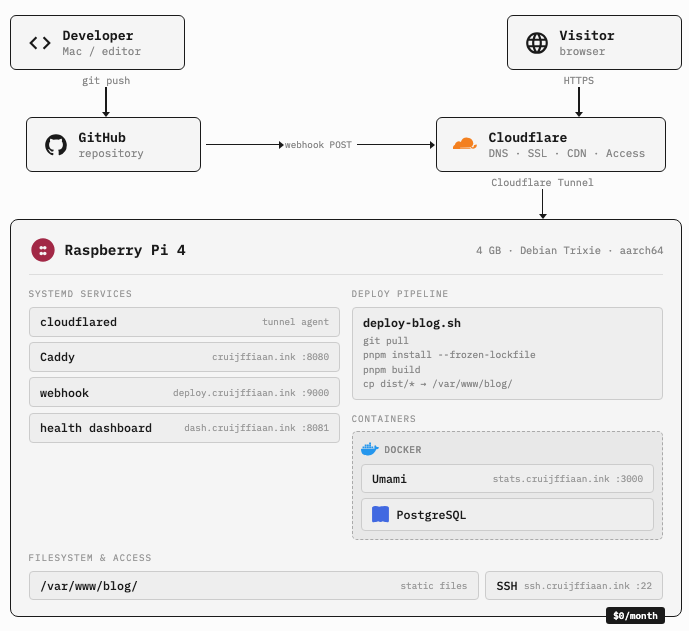
## [The hardware](#the-hardware)
The site runs on a Raspberry Pi 4 with 4GB of RAM and a 64GB SD card. It sits on a shelf in my apartment, connected to Wi-Fi. The hardware cost less than what most people pay for a year of cloud hosting. It’s a credit card-sized computer plugged into a wall. That’s the whole server.
## [The stack](#the-stack)
The blog is built with Astro 5 and MDX. Posts are markdown files in a git repository. There’s no database and no CMS. Content management is a text editor and `git push`.
On the Pi:
- **Caddy** serves the static build output on port 8080. It handles gzip, caching headers, and security headers. TLS happens elsewhere.
- **cloudflared** maintains a persistent outbound connection to Cloudflare’s edge. This is the Tunnel agent. It makes the Pi reachable from the internet without opening any ports on the router.
- **Cloudflare** handles DNS, SSL termination, and caching. The domain
`cruijffiaan.ink`is registered through Cloudflare Registrar at cost.
The home IP is never exposed and there are no open ports on the router. From the outside, the blog looks like it’s hosted on Cloudflare. From the inside, it’s a $35 computer on Wi-Fi.
## [The deploy pipeline](#the-deploy-pipeline)
When I push to `main`, the blog rebuilds itself:
`git push origin main`hits GitHub- GitHub sends a webhook POST to
`deploy.cruijffiaan.ink` - A webhook listener on the Pi verifies the HMAC-SHA256 signature
- If valid, it runs a deploy script: pull the latest code, install dependencies, build, copy the output to the web root
- Caddy picks up the new files immediately, no restart needed
The whole process takes about 90 seconds. Most of that is `pnpm build` compiling the Astro site on an ARM processor.
## [Analytics](#analytics)
The blog uses Umami, a self-hosted analytics platform. It runs in Docker on the same Pi alongside a PostgreSQL database. The dashboard lives at `stats.cruijffiaan.ink`, behind Cloudflare Access.
Umami doesn’t set cookies, doesn’t collect personal data, and doesn’t track across sites. It tells me how many people visited, which pages they read, and where the traffic came from. That’s enough.
The tracking script only loads in production. In development, there’s no analytics code at all.
## [Monitoring](#monitoring)
A health check script runs every minute via cron. It pokes at systemd services, Docker containers, local and external HTTP endpoints, DNS, SSL expiry, CPU temperature, memory, and disk. The results get written as JSON and served by a static dashboard at `dash.cruijffiaan.ink`, also behind Cloudflare Access.
There’s a CLI version of the same check for when SSH is more convenient than a browser.
## [Remote access](#remote-access)
SSH to the Pi works from any network through Cloudflare Tunnel. The connection goes through `ssh.cruijffiaan.ink` using `cloudflared access ssh` as a ProxyCommand. You authenticate through Cloudflare Access in the browser first, then SSH key auth takes over.
## [What it costs](#what-it-costs)
| | Item | | Cost | |
|---|---|
| | --- | | --- | |
| | Domain | | ~$19/year | |
| | Cloudflare (tunnel, DNS, SSL, caching, Access) | | Free | |
| | Raspberry Pi hardware | | ~$70 one-time | |
| | Electricity | | ~$5/year | |
| | **Monthly hosting cost** | | **$0** | |
The recurring cost is the domain and electricity. Everything else is either free or already paid for.
## [Why self-host](#why-self-host)
I could put this on Vercel or Netlify and never think about it again. The deploy would be faster, the CDN would be global, and I wouldn’t have to worry about my Pi’s SD card dying.
But I like knowing where the site lives. The hardware is ten feet from where I sleep, the monthly bill is zero, the analytics data stays on my machine, and none of it depends on a company’s free tier continuing to exist.
This page explains how the blog is hosted. It was written by Claude, the same AI that helped build the setup. If you want the version with port numbers and config details, toggle the switch above.
## [Where it lives](#where-it-lives)
The blog runs on a Raspberry Pi — a small computer about the size of a credit card. It sits on a shelf in my apartment, plugged into a wall outlet and connected to Wi-Fi. It draws about 5 watts. The whole thing cost around $70.
## [How it reaches the internet](#how-it-reaches-the-internet)
The Pi isn’t directly on the internet. It keeps a connection open to Cloudflare, which sits in between. When you visit the blog, your request goes to Cloudflare first, and Cloudflare passes it through to the Pi. My home network address is never visible to anyone.
Cloudflare also handles the security certificate (the lock icon in your browser), caching, and translating the domain name into a location. The domain costs about $19 a year. Everything else from Cloudflare is free.
## [How updates work](#how-updates-work)
When I push new writing to GitHub, a signal gets sent to the Pi. It pulls the latest version, rebuilds the site, and swaps in the new files. Takes about 90 seconds. No manual steps after the initial push.
## [Visitor tracking](#visitor-tracking)
The blog tracks page views using Umami, a small analytics tool running on the same Pi. It doesn’t use cookies, doesn’t collect personal information, and doesn’t follow visitors across sites. It tells me which pages people read and where traffic came from. The data stays on my machine.
## [The cost](#the-cost)
| | Item | | Cost | |
|---|---|
| | --- | | --- | |
| | Domain | | ~$19/year | |
| | Cloudflare | | Free | |
| | Raspberry Pi | | ~$70 one-time | |
| | Electricity | | ~$5/year | |
| | **Monthly hosting** | | **$0** | |
The recurring cost is the domain and electricity. Everything else is either free or already paid for.
## [Why bother](#why-bother)
I could use a hosting service and never think about any of this. The deploy would be faster, the CDN global, and I wouldn’t worry about the Pi’s SD card dying.
But I like knowing where the site lives. The hardware is ten feet from where I sleep, the monthly bill is zero, and the analytics data stays on my machine.